04. Scope
If you took Intro to Javascript, you learned about block scope vs. function scope. These determine where a variable can be seen in some code. Computer scientists call this lexical scope.
However, there also exists another kind of scope called runtime scope. When a function is run, it creates a new runtime scope. This scope represents the context of the function, or more specifically, the set of variables available for the function to use.
So what exactly does a function have access to?
OOJS L2 32 - Scope Intro
Scope
A function's runtime scope describes the variables available for use inside a given function. The code inside a function has access to:
- The function's arguments.
- Local variables declared within the function.
- Variables from its parent function's scope.
- Global variables.
Check out the following image that highlights a function's scope, then we'll take a look at a live example.
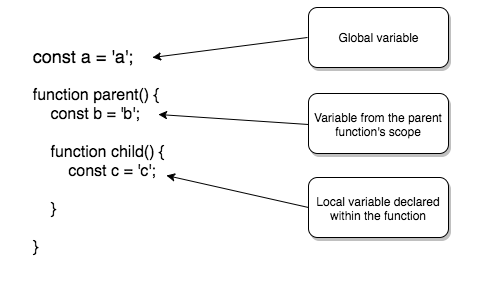
The nested child() function has access to all a, b, and c variables. That is, these variables are in the child() function's scope.
L2 - 34 - Scope Demo
Video Recap
In the previous video, the introduceMyself() function contains a nested introduce() function. While introduce() does not take in any arguments, nor are there any local variables declared within it -- variables in both the aforementioned settings are indeed in introduce()'s scope.
introduce() does use the global variable myName, however, as well as the you variable contained in its parent function, introduceMyself() (where introduce() was defined). Both are highlighted below:
const myName = 'Andrew';
// Global variable

function introduceMyself() {

  const you = 'student';
  // Variable declared where introduce() is defined
  // (i.e., within introduce()'s parent function, introduceMyself())

  function introduce() {
    console.log(`Hello, ${you}, I'm ${myName}!`);
  }

  return introduce();
}SOLUTION:
- `num1`
- `num2`
- `num3`
- `num4`
JavaScript is Function-Scoped
You may be wondering why scope is so heavily associated with functions in JavaScript. Especially if you've had past experience in another programming language, this might seem a bit unusual (e.g., blocks in Ruby have their own scope)!
This is all because variables in JavaScript are traditionally defined in the scope of a function, rather than in the scope of a block. Since entering a function will change scope, any variables defined inside that function are not available outside of that function. On the other hand, if there are any variables defined inside a block (e.g., within an if statement), those variables are available outside of that block.
Let's see an example of how function-scoping in JavaScript works:
var globalNumber = 5;

function globalIncrementer() {
  const localNumber = 10;

  globalNumber += 1;
  return globalNumber;
}
In the example above, globalNumber is outside the function; it is a global variable that the globalIncrementer() function has access to. globalIncrementer() simply has a local variable (localNumber) declared within it, then increments globalNumber by 1 before returning the updated value of globalNumber itself.
After calling the function a few times, we see that the value of globalNumber has indeed increased each time:
console.log(globalIncrementer());
// 6

console.log(globalIncrementer());
// 7

console.log(globalIncrementer());
// 8
However, when attempting to access localNumber outside of the function, we see a error:
console.log(localNumber);

// ReferenceError: localNumber is not defined
Because JavaScript is function-scoped, functions have access to all its own variables as well as all the global variables outside of it. For more details on block scoping, check out Further Research at the end of this page.
💡 Block-Scoping 💡
ES6 syntax allows for additional scope while declaring variables with the
letandconstkeywords. These keywords are used to declare block-scoped variables in JavaScript, and largely replace the need forvar.We've used them throughout this course, but for a closer look, check out our course: ES6 - JavaScript Improved. Via MDN:
Scope Chain
Whenever your code attempts to access a variable during a function call, the JavaScript interpreter will always start off by looking within its own local variables. If the variable isn't found, the search will continue looking up what is called the scope chain. Let's take a look at an example:
function one() {
  two();
  function two() {
    three();
    function three() {
      // function three's code here
    }
  }
}

one();
In the above example, when one() is called, all the other nested functions will be called as well (all the way to three()).
You can visualize the scope chain moving outwards starting at the innermost level: from three(), to two(), to one(), and finally to window (i.e., the global/window object). This way, the function three() will not only have access to the variables and functions "above" it (i.e., those of two() and one()) -- three() will also have access to any global variables defined outside one().
Let's now revisit the image from the beginning of this section, and visualize the entire process:
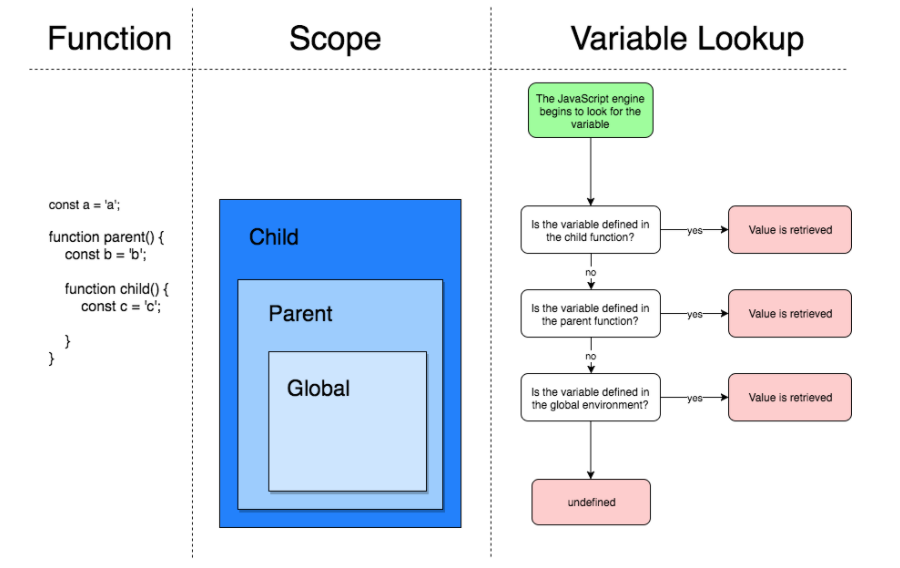
When resolving a variable, the JavaScript engine begins by looking at the nested child function's locally-defined variables. If found, then the value is retrieved; if not, the JavaScript engine continues to looking outward until the variable is resolved. If the JavaScript engine reaches the global scope and is still unable to resolve the variable, the variable is undefined.
💡 The Global (
window) Object💡Recall that when JavaScript applications run inside a host environment (e.g., a browser), the host provides a
windowobject, otherwise known as the global object. Any global variables declared are accessed as properties of this object, which represents the outermost level of the scope chain.For a refresher, feel free to check out Beware of Globals in Lesson 1.
Variable Shadowing
What happens when you create a variable with the same name as another variable somewhere in the scope chain?
JavaScript won't throw an error or otherwise prevent you from creating that extra variable. In fact, the variable with local scope will just temporarily "shadow" the variable in the outer scope. This is called variable shadowing. Consider the following example:
const symbol = '¥';

function displayPrice(price) {
  const symbol = '$';
  console.log(symbol + price);
}

displayPrice('80');
// '$80'
In the above snippet, note that symbol is declared in two places:
- Outside the
displayPrice()function, as a global variable. - Inside the
displayPrice()function, as a local variable.
After invoking displayPrice() and passing it an argument of '80', the function outputs '$80' to the console.
How does the JavaScript interpreter know which value of symbol to use? Well, since the variable pointing to '$' is declared inside a function (i.e., the "inner" scope), it will override any variables of the same name that belong in an outer scope -- such as the global variable pointing to '¥'. As a result, '$80' is displayed rather than '¥80'.
All in all, if there are any naming overlaps between variables in different contexts, they are all resolved by moving through the scope chain from inner to outer scopes (i.e., local all the way to global). This way, any local variables that have the same name take precedence over those with a wider scope.
SOLUTION:
`8`QUIZ QUESTION::
When searching for variables along the scope chain, in what order will the JavaScript interpreter search?
ANSWER CHOICES:
|
Order |
Location |
|---|---|
Local variables |
|
Parent function's parent function's variables |
|
Parent function's variables |
|
Global variables |
SOLUTION:
|
Order |
Location |
|---|---|
|
Local variables |
|
|
Parent function's parent function's variables |
|
|
Parent function's variables |
|
|
Global variables |
SOLUTION:
`10`, `9`, `8`Summary
When a function is run, it creates its own scope. A function's scope is the set of variables available for use within that function. The scope of a function includes:
- The function's arguments.
- Local variables declared within the function.
- Variables from its parent function's scope.
- Global variables.
Variables in JavaScript are also function-scoped. This means that any variables defined inside a function are not available for use outside the function, though any variables defined within blocks (e.g. if or for) are available outside that block.
When it comes to accessing variables, the JavaScript engine will traverse the scope chain, first looking at the innermost level (e.g., a function's local variables), then to outer scopes, eventually reaching the global scope if necessary.
In this section, we've seen quite a few examples of a nested function being able to access variables declared in its parent function's scope (i.e., in the scope in which that function was nested). These functions, combined with the lexical environment it which it was declared, actually have a very particular name: closure. Closures are very closely related to scope in JavaScript, and lead to some powerful and useful applications. We'll take a look at closures in detail next!
Further Research
- Intro to JavaScript (Lesson 5's coverage of scope)
- Douglas Crockford's discussion of block-scoped variables in The Better Parts
- Block Scoping Rules on MDN
- Functions and Function Scope on MDN